For buy here, pay here dealerships

Websites Built for Buy Here Pay Here Dealerships

Your customers usually have a question before they have a favorite car: can they get approved, and what will it take? A Greenlot BHPH website explains how your financing works, shows what's on your lot, and walks shoppers into an application one step at a time.

It runs on the same platform as every Greenlot website, so applications land in MyOnlineInventory next to your inventory and leads. Your team still makes every credit decision.

The application opens on Mountain View Motors, our demo dealership. Please use made-up details: anything sent there goes to the demo dealership's CRM, not a real dealer.
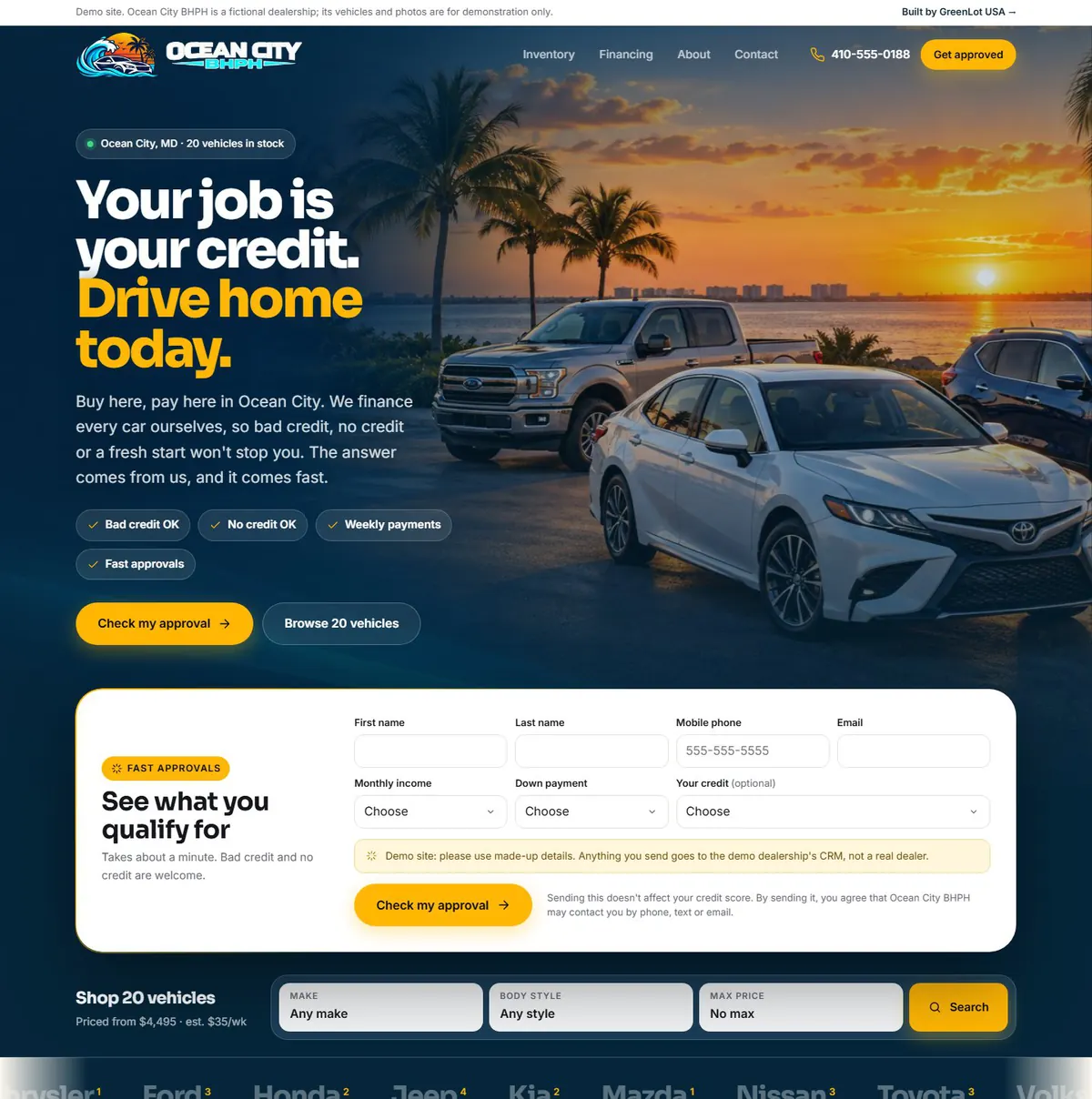
Ocean City BHPH demo homepage with a quick approval form under the headline

Ocean City BHPH is a made-up demo dealership we built to show the BHPH options on this page.
The challenge

BHPH shoppers need answers before they'll apply

Many buy here, pay here customers have been turned down somewhere else. Before they share their information, they want to know what you'll ask for, what they should bring, how payments work, and whether applying commits them to anything.

A website that hides financing behind one long form leaves those questions unanswered. Shoppers either call with questions your team answers over and over, or they leave. Your website should explain your program in your own words and make the first step feel small.

Guided credit application

A Credit Application That Takes It One Step at a Time

Give shoppers a more approachable way to apply. Our guided credit application breaks the process into short, manageable sections, helping customers focus on one step at a time instead of facing one long form.

  1. You

    Name, email, mobile phone and date of birth.

  2. Home

    Address, whether they own or rent, and how long they've lived there. Housing payment is optional.

  3. Work

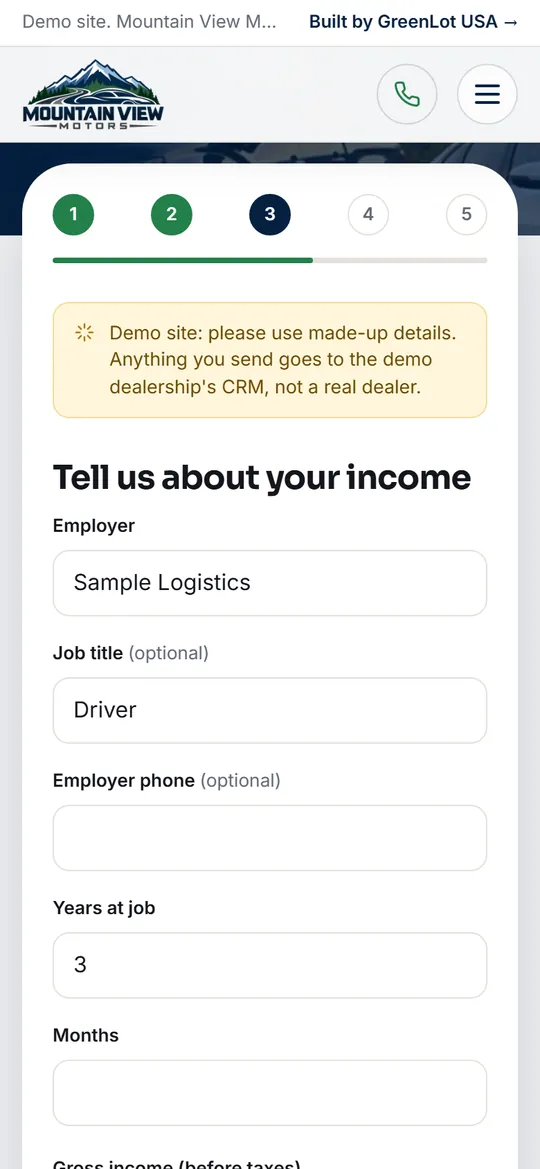
    Employer, time on the job, and income in the pay schedule they actually get: weekly, every two weeks, twice a month, monthly or yearly.

  4. Vehicle

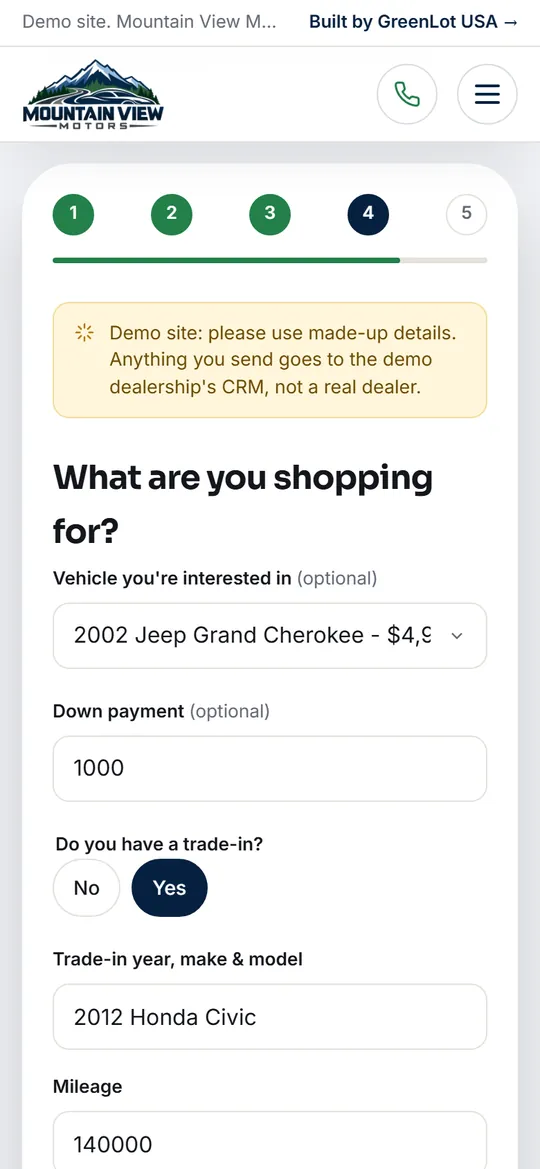
    The car they want, a down payment and any trade-in. All optional, so nobody gets stuck here.

  5. Review

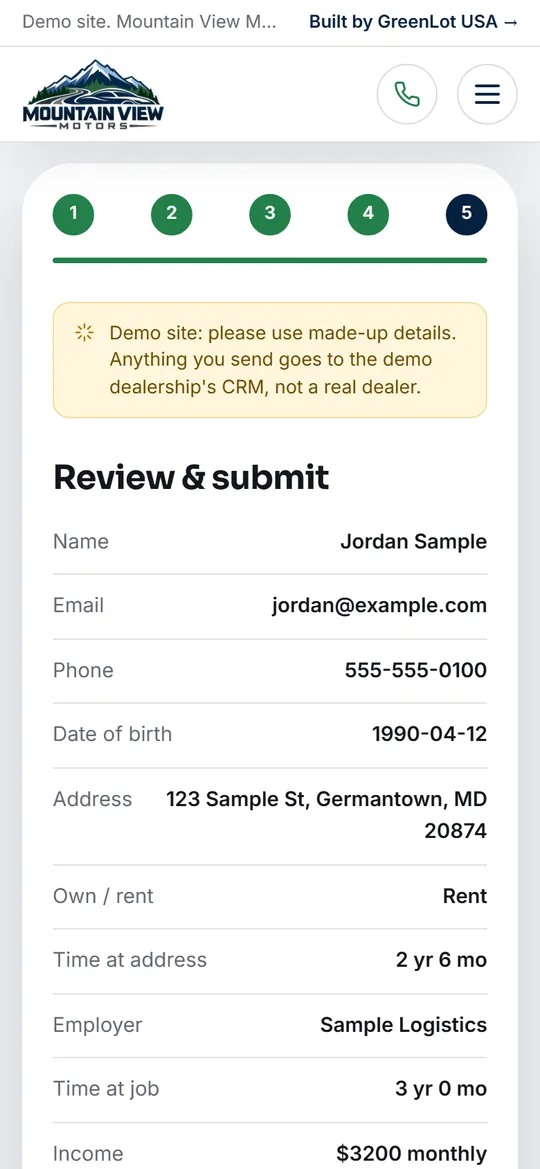
    Every answer on one screen to check, then a consent box and submit.

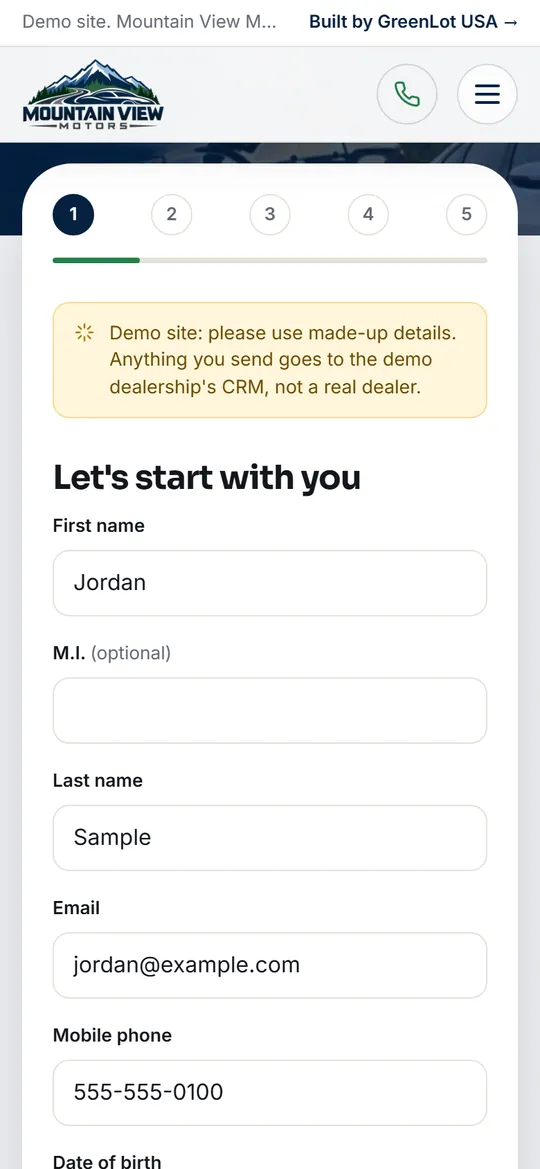
Step 1 of the guided credit application on a phone, with numbered steps and a progress bar
Step 1: a few basics. Numbered steps and a progress bar show how far they've come.
Step 3 of the credit application asking about employer and income
Step 3: work and income, in the pay schedule the shopper actually gets.
Step 4 of the credit application with trade-in fields showing after Yes is chosen
Step 4: trade-in fields only appear after the shopper says they have one.
Step 5 of the credit application showing a review of every answer
Step 5: every answer on one screen to check before submitting.

Screenshots from the Mountain View Motors demo, filled in with sample details. Nothing was submitted.

Built to feel manageable

  • One step at a time. Only the current step is on screen, with numbered steps and a progress bar above it. On phones the step names shrink to numbers so the form gets the room.
  • Questions only when they apply. Trade-in details appear only when the shopper says they have a trade.
  • The car comes along. Apply from a vehicle page and the application already knows which car, with its photo and price beside the form.
  • No Social Security number online. The page says so up front. Your team collects it securely when you follow up.
  • No pressure. The form tells shoppers that applying doesn't obligate them to buy, and puts your phone number beside it for anyone who'd rather talk.

Two options for BHPH lots

  • Save each step as it goes. The first step (name, phone and email) creates the lead and emails your managers that an application has started. Each later step adds to the same lead, and your managers get a second email when it's finished. If a shopper stops halfway, you still know who they are and how far they got.
  • Cheer them on. A short message and a burst of confetti after each step, like “Nice to meet you, Jordan!” and “Paycheck: check!” You can change the wording. Shoppers who've turned on reduced motion get the message without the animation.

Both options are on our Ocean City BHPH demo. The Mountain View Motors demo linked above shows the standard five-step application.

How applications reach you

From the shopper's phone to your Leads inbox

  1. The shopper applies

    On the financing page, from a vehicle page, or through the quick approval form on your homepage.

  2. It lands in MyOnlineInventory

    Applications arrive in your Leads inbox as a Website Credit Application, tied to the vehicle they picked. Quick approvals arrive as a Website Quick Approval.

  3. Your managers are emailed

    Everyone set up as a manager for your dealership gets an email right away, so someone can call while the shopper is still interested.

  4. Junk is screened out

    A hidden spam trap, a minimum fill time, a same-site check and spam scoring stop most bots. Google reCAPTCHA can be added, and MyOnlineInventory runs its own spam check.

  5. Your team takes it from there

    You follow up, collect anything sensitive securely, and make the credit decision.

Want a second look at who's applying? The Applicant Intelligence add-on gives each applicant an Identity Confidence score built from phone and cross-application checks. It's a verification signal, not a credit check or an approval decision.

Explain your program

Answer financing questions before they're asked

These are settings of the website itself, turned on for your dealership and written in your words. We only publish what's true for your lot: no “guaranteed approval,” and no promises about who gets approved.

A quick approval form up front

A short form on your homepage asks for name, phone, email, monthly income, down payment and credit. It takes about a minute, and the full application is there when they're ready.

Payments the way you collect them

Show every payment estimate weekly, every two weeks or monthly, using the rate and term you choose. Vehicle pages include a payment calculator.

Down payments on every car

Show each vehicle's down payment on its listing and vehicle page, use it in payment estimates, and let shoppers filter by down payment.

The credit situations you work with

A section that names the situations you finance, written by you, plus a “what to bring” checklist so customers show up ready.

How it works, in plain steps

A short “how it works” section on the homepage, and a financing page headline, intro and key points in your own words.

A disclaimer you approve

Every site has a footer disclaimer you review before launch. Payment estimates are advertising, so check the wording with your compliance advisor.

Clear roles

What Greenlot does, and what stays with your dealership

Greenlot USA

Builds and runs the tools

  • Designs, hosts and maintains your website
  • Sets up the credit application and quick approval form
  • Delivers every application to MyOnlineInventory and emails your managers
  • Keeps your inventory and payment estimates current on the site
  • Supports your team by phone, email and chat
Your dealership

Makes every credit decision

  • Reviews applications and decides who to approve
  • Sets rates, terms and down payments
  • Collects sensitive information securely during follow-up
  • Services loans and collects payments in the system you use today
  • Approves the financing wording and disclaimer on the site

Greenlot doesn't underwrite, approve or decline applications, service loans or collect payments, and nobody can promise approval on your behalf. MyOnlineInventory's deal management keeps lenders, stips, taxes and fees, F&I products and a signed credit authorization together for each deal, but it isn't a loan-servicing or collections system.

Pricing

One plan, with the BHPH tools built into the website

The guided credit application, the quick approval form and the BHPH options above are part of your website, not Add-On Store extras.

$500 one-time setup

then $100 a month

The setup fee is paid before we start building. It covers your custom website, account and team setup, email configuration and training. The monthly plan starts the day your website launches.

Included every month

  • Your Greenlot website and its hosting
  • MyOnlineInventory: inventory tools, the Leads inbox, deal management and customer follow-up
  • The core AI tools, including vehicle descriptions and vehicle videos
  • Unlimited vehicles and unlimited leads
  • Website changes and support from real people

Optional

  • Add-ons from the Add-On Store inside MyOnlineInventory, such as Social Studio, Review Engine and Applicant Intelligence. Each one is added to your monthly total, and its price is shown before you turn it on.
  • Advanced SEO, a separate Greenlot USA service starting at $500 a month.

Month-to-month, with no contract. Billing is by card. Questions about price? Call (419) 357-9298.

Getting started

How we build and launch your BHPH website

  1. Book a demo

    See MyOnlineInventory with vehicles like yours and get straight answers on price. Request a demo.

  2. We build your website

    We design your site for your dealership and set up your account, your team's logins and email.

  3. We help load your lot

    Get help entering your inventory and photographing vehicles, so the site opens with a full lot.

  4. Train and go live

    Your team learns the app, the site launches on your domain, and leads start landing in one place.

What we'll need from you

  • Your logo, plus any photos of your lot, team and vehicles you'd like to use
  • Your business name, address, phone and hours, exactly as you want them shown
  • Your story for the About page. Everything on it has to be true for your dealership.
  • Who should get lead emails at the dealership
  • Real customer reviews, if you want a reviews section. We never write them.
  • Your social media links, and your Google Analytics account if you have one
  • Your financing wording: how your program works, what shoppers should bring, the payment-estimate settings, and the footer disclaimer. You review all of it before launch.

Switching from another website

  • Your new site runs on your dealership's own domain name, like wndmotors.com.
  • At launch, the domain is pointed at your new Greenlot site. We'll need access to its settings, or the person who manages it.
  • Your vehicles move into MyOnlineInventory, and we help you enter and photograph them during setup.
  • Tell us who hosts your current site and who controls your domain on the demo call, and we'll walk through the switch with you.
FAQ

Questions about BHPH websites and the credit application

Five: about the shopper, their home, their work and income, the vehicle they want, and a review screen. Each step shows only a few questions, with a progress bar so shoppers can see how far they've come.

Yes. It's built for phone screens: one step at a time, large fields, and step labels that shrink to numbers so the form gets the room. Your phone number sits beside the form for anyone who'd rather call.

Into your Leads inbox in MyOnlineInventory as a Website Credit Application, tied to the vehicle the shopper picked, and every manager at your dealership gets an email. With step-by-step saving on, your managers hear when an application starts and again when it's finished.

No. The application never asks for it online and says so up front. Your team collects it securely when you follow up.

The application doesn't keep a draft for the shopper to come back to. With step-by-step saving turned on, your team already has everything they entered and can call to finish it together.

Not through the website application. Your team collects documents when you follow up.

Yes. The financing page headline, intro and key points, the step titles, and the cheers after each step can all be written your way. You review the consent wording and the footer disclaimer before launch.

No. Your dealership makes every credit decision and services its own loans. Greenlot builds the website and delivers applications to your team.

The guided application is part of Greenlot websites, which run on MyOnlineInventory. If you'd like to keep your current website, talk to us about your setup first.

$500 one-time setup, then $100 a month for your website, hosting and MyOnlineInventory. The BHPH tools are part of the website. Optional add-ons and Advanced SEO cost extra.

Make applying feel like a smaller step

Try the guided application on our demo dealership, or tell us about your lot and we'll show you a BHPH site built around your program.